
Laser · Plasma · Waterjet · Router · Shear · Saw
Fit more parts on every sheet. Free DXF nesting for laser, plasma, waterjet, and router.
Nesting software that runs in your browser. Drop in DXF parts and get them packed tight by their true shapes, with a DXF of every sheet. Or type a cut list and get a shear cut plan for sheet, or the fewest bars for tube and bar.
Three tools
Shapes, sheets or lengths.
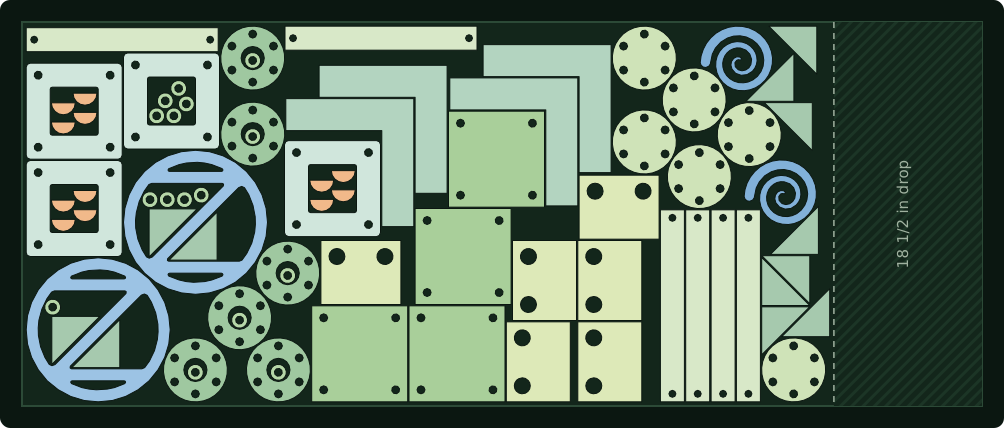
A real nest: 80 pieces of twelve parts on a 48 x 120 sheet, 32 of them inside other parts' holes, leaving an 18 1/2 in drop. Cut shape nesting
Drop in DXF parts and Nestor nests them by their true shapes for laser, plasma, waterjet and router, small parts inside the holes of bigger ones. You get every sheet drawn on screen, a DXF of each one for your cutting software, the blank each needs and the clean drop left over, and a cut time estimate.
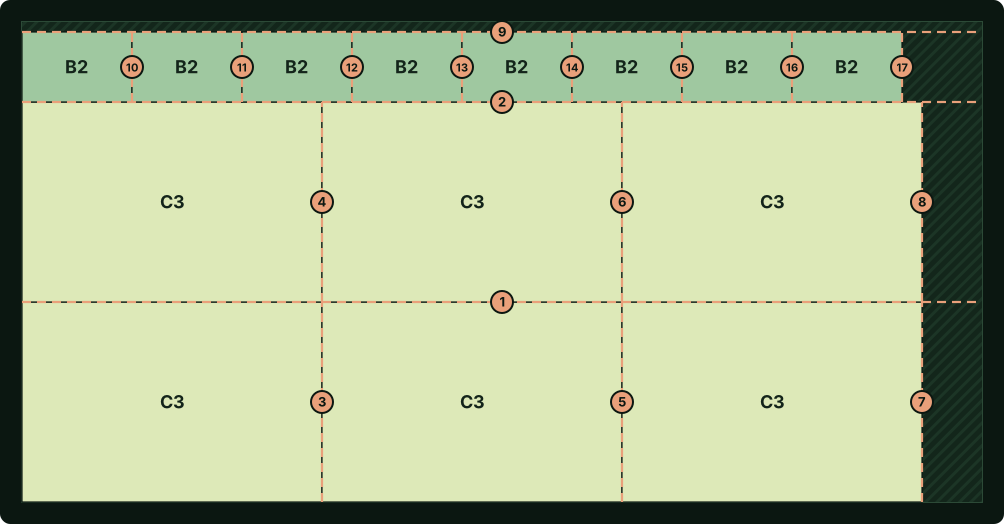
A real shear cut plan: a 48 x 96 sheet cut into pieces marked B2 and C3, the cuts numbered 1 to 17 in the order to make them. Shear nesting
Type or paste a cut list of squares and rectangles and pick your sheet sizes. You get each sheet laid out for a shear, every cut numbered in order with its back gauge setting, an operator view for a tablet at the shear, and a PDF cut plan.
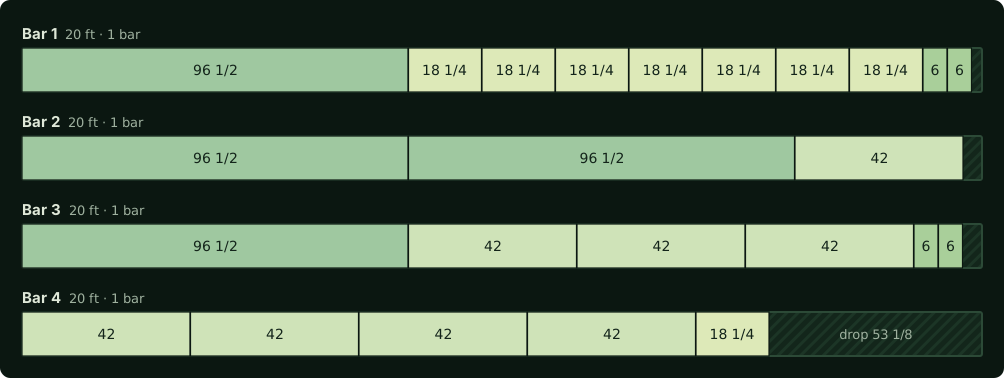
A real cut list: posts, rails, braces and caps for a handrail from four 20 ft bars of tube, 93% of the steel in pieces. Linear nesting
Type or paste a cut list of lengths and pick your stock lengths of bar, tube, pipe, angle, channel or beam. You get the fewest bars the job needs, each drawn with its pieces in the order to cut and the drop at the end, the saw's kerf allowed for, the weight if you give it, and a PDF cut list.
Need the part drawn first? The free DXF generator draws flanges, base plates, rings, discs, square and rectangle plates, hexagons and gussets from a few sizes, ready to download as a DXF or a PDF drawing, or to nest. No account needed to download. Watch the 1:32 demo.
Built for shops that cut a lot.
True-shape nesting
Parts nest by their real outlines, not the boxes around them, turned in quarter turns and finer steps down to 5°, whichever nests tightest.
Any sheet or remnant
Standard sizes, a custom size, or an odd-shaped blank drawn in a DXF, mixed as you like.
Clean DXF out
Every nested sheet downloads as its own DXF, with round holes as true circles, ready for your CAM.
Cut time estimates
Roughly how long the job will take on a laser, plasma, waterjet or CNC router, by material and thickness.
Your library
Parts you add, nests you save, and shear and linear jobs, kept in your account and sorted into folders if you like.
Free, in your browser
Nothing to buy or install. Create an account with an email address; no password.
What’s new
Lately in Nestor.
Drawings call out corners and notches
A PDF drawing from the DXF generator or the parts library now calls out the arcs of a part's outline as well as its holes: rounded corners by radius with their count, and a notch cut into an edge with its radius, width and depth, its ends dimensioned from the edge. Each callout sits level with what it names.
More about drawings call out corners and notchesNesting picks the turns for you
Cut shape nesting no longer asks for a rotation step. It nests with quarter turns first, then tries 45°, 22.5°, 15° and 5° steps, and keeps whichever nest is tightest. Triangles and gussets, which often pair up best at quarter and half turns, no longer lose that nest to a finer step.
PDF drawings of your parts
The DXF generator gives a one-page PDF drawing of the part as well as its DXF: the part to scale, its overall size and every hole dimensioned, in inches or millimeters, free and without an account. In the parts library, open any saved part to download a PDF drawing of it too.
More about pdf drawings of your parts
Questions
Nesting, answered.
What is DXF nesting?
Nesting arranges flat parts on a sheet of material so that as many as possible fit with the least scrap. Nestor reads your DXF files, nests the parts by their true shapes, turning them to fit, and gives you a DXF of each nested sheet for your cutting software.
Is Nestor free?
Yes. Nestor is a free online nesting tool. An account needs only an email address: you sign in with a code Nestor emails you, with no password.
Which machines does Nestor work with?
Any machine that cuts from DXF files: laser, plasma, waterjet, and CNC router. Nestor writes a standard DXF of each nested sheet, which your CAM or machine software turns into a toolpath.
Does Nestor work in inches or millimeters?
Both. One switch changes every measurement on the page and the units of the DXF files you download.
Can I nest parts on a remnant or an odd-shaped sheet?
Yes. Pick a standard sheet size, enter a custom size, or open a DXF of the remnant's outline, including any cutouts, and Nestor nests inside it. A feature that turns a photo of a remnant into a DXF blank is planned.
How long will my nest take to cut?
Nestor estimates roughly how long the job will take on a laser, plasma, waterjet, or CNC router: one total for the whole nest, from cutting-speed tables by material and thickness, covering the length of every cut and each pierce or plunge, plus handling and setup. It is an estimate only: every machine runs differently, so check it against your own times before you quote from it.
How much space should I leave between parts on a CNC router?
At least the diameter of the bit plus a little clearance, so the bit can pass between neighboring parts. Choose a router and its bit in Nestor and the part spacing is set to the bit plus 1/16 inch, for example 0.3125 inch for a 1/4 inch bit. Inside corners come out rounded to the bit's radius.
Does Nestor do shear nesting?
Yes. Besides true-shape DXF nesting, Nestor has shear nesting, a cut list optimizer for squares and rectangles cut on a shear. Type or paste a cut list and pick your sheet sizes; Nestor lays the pieces out with cuts that run edge to edge across the plate, as a shear cuts, and numbers every cut with its back gauge setting.
Does Nestor do linear nesting for bar and tube?
Yes. Linear nesting takes a cut list of lengths and the stock lengths you have, such as 20 ft or 24 ft bar, tube, pipe, angle, channel or beam, and works out how to cut them from as few bars as it can, allowing for the saw's kerf, with the drop from each bar.
How do I start?
Create a free account at nestorspace.com with your email address. Nestor emails you a code to sign in; there is no password. Then pick a tool: cut shape nesting, shear nesting or linear nesting.
Guides
For shops that cut.
- How to export a DXF for cuttingStep-by-step DXF export for cutting from Autodesk Fusion, SolidWorks, AutoCAD, Inventor, Onshape, FreeCAD, Inkscape, Illustrator and SketchUp, with a checklist for a clean file.
- Kerf width by cutting processWhat kerf is, typical kerf widths for fiber laser, CO2 laser, plasma, abrasive waterjet and CNC router, plasma kerf by thickness from Hypertherm's charts, and how kerf affects part spacing in a nest.
- Nesting for laser, plasma, waterjet and routerHow nesting differs between laser, plasma, waterjet and CNC router: part spacing, heat and distortion, lead-ins and pierce points, common-line cutting, taper, small holes and holding router parts down.
- Sheet metal gauge chartSheet metal gauge to inches and millimeters for steel, stainless, galvanized steel and aluminum, with steel weight per square foot and standard sheet sizes for laser, plasma and waterjet cutting.