
Free DXF nesting software for laser, plasma, waterjet and router
Drop in your DXF parts and Nestor nests them by their true shapes, not the boxes around them. You get every sheet drawn on screen, a DXF of each one ready for your CAM, and the drop left over. It runs in your browser, it's free, and there's nothing to install.
Just an email address. Nestor emails you a code to sign in; there’s no password.
How it works
Add your parts
Open one or more DXF files and set how many of each you need. Inches or millimeters.
Pick your sheet
Choose a standard size like 48 x 96 or 60 x 120, type in a custom size, or open a DXF of a remnant's outline, cutouts and all.
Pick your machine
Laser, plasma, waterjet or CNC router. Nestor fills in the part spacing and edge margin to suit it, from the bit on a router, and you can change them.
Nest and download
Nestor packs the parts tight, tries different turns, and keeps the best nest. Download a DXF of each sheet and take it to your cutting software.
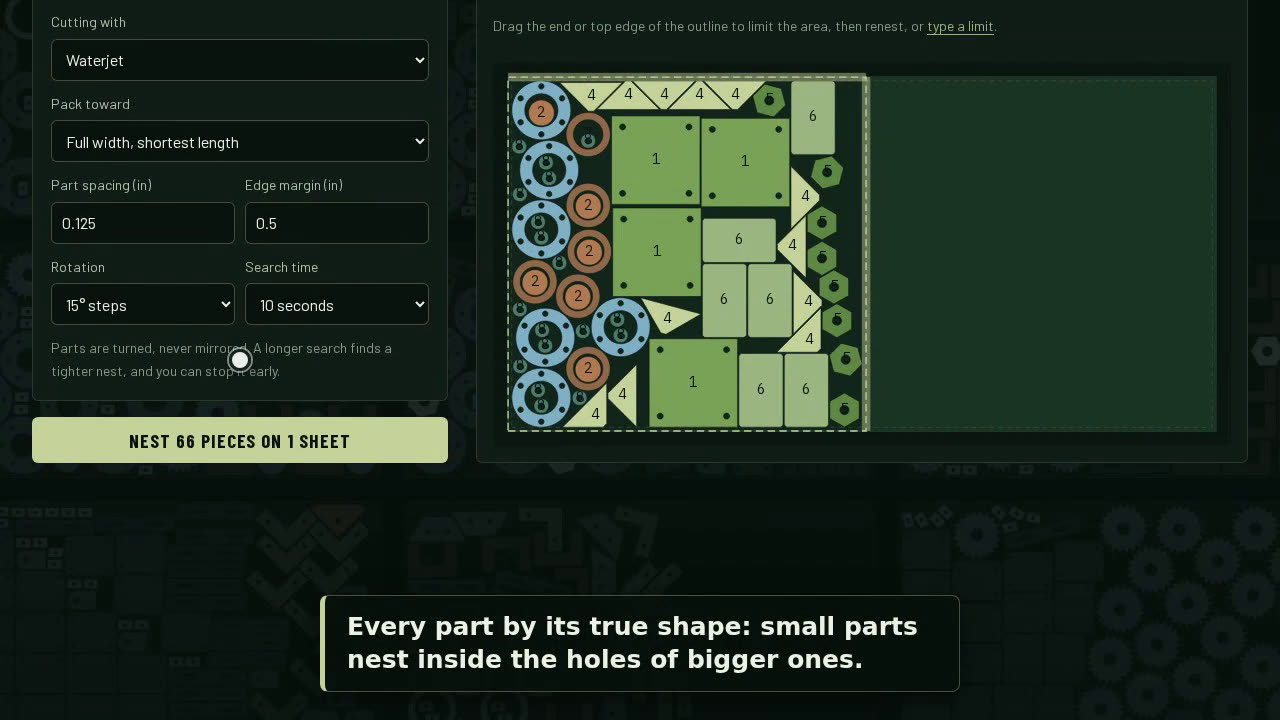 Watch the 1:45 demo videoCut shape nesting from start to finish, silent, with captions.
What a real nest looks like
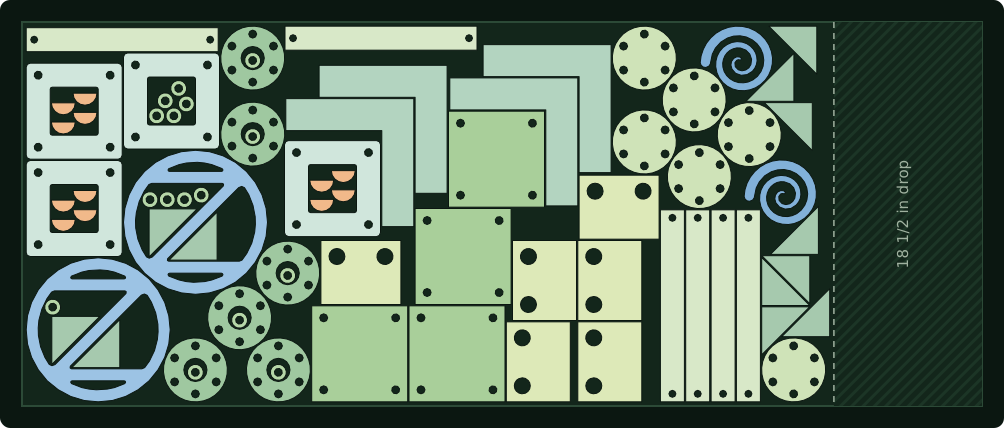
Built for parts that aren’t rectangles
- True-shape nesting. Parts nest by their real outlines. A gusset tucks against a flange, and a washer drops into the bore of a base plate. Box nesting can't do that, so it leaves steel on the table.
- Parts inside parts. Small parts get placed inside the holes and cutouts of larger ones, so the middle of a ring or flange becomes washers instead of scrap.
- Turns picked for you. Nestor nests with quarter turns first, then tries 45°, 22.5°, 15° and 5° steps and keeps whichever nest is tightest. You don't have to guess the right setting.
- Any sheet or remnant. Standard sizes, a custom size, or an odd-shaped skeleton or drop drawn as a DXF, including cutouts. Mix sheet sizes in the same job if you like.
- Clean DXF out. Every nested sheet downloads as its own DXF, with round holes kept as true circles rather than chopped into line segments, so your CAM reads them as holes.
- Cut time estimates. Roughly how long the job will take on a laser, plasma, waterjet or CNC router, by material and thickness. It's an estimate, so check it against your own machine before you quote from it.
- Router-aware spacing. Choose a router and bit and Nestor sets part spacing to the bit diameter plus 1/16 in. A 1/4 in bit gets 0.3125 in. Inside corners come out rounded to the bit radius.
- Your library. Parts you add and nests you save are saved to your account, sorted into folders if you want.
Why use a browser nesting tool?
Most free nesting programs are desktop downloads you have to install, configure, and keep running on one machine. The online ones often let you nest for free but charge to download the DXF. Nestor does neither:
- Nothing to install. It works on the shop PC, the office laptop, or a tablet.
- Free DXF download. The nested DXF is the whole point, and it’s free.
- Your work follows you. Saved parts and nests are in your account, not stuck on one computer.
Works with the software you already have
Nestor writes a standard DXF of each nested sheet. Your CAM or machine software (SheetCam, your plasma table’s software, your laser’s CAM, or your router’s CAM) turns it into a toolpath as usual. Nestor doesn’t write G-code. It hands you a nest your CAM can cut.
Need a clean DXF to start with? See How to export a DXF for cutting for step-by-step instructions from Fusion, SolidWorks, AutoCAD, Inventor, Onshape, FreeCAD, Inkscape, Illustrator and SketchUp.
Don’t have a drawing yet? The free DXF generator draws flanges, base plates, rings, discs, plates, hexagons and gussets from a few sizes, ready to nest.
Nesting questions
What is DXF nesting?
Nesting arranges flat parts on a sheet so as many as possible fit with the least scrap. DXF nesting does that from DXF drawings. Nestor reads your DXF parts, packs them by their true shapes, and writes a DXF of each nested sheet for your cutting software.
What's the difference between true-shape nesting and rectangular nesting?
Rectangular (box) nesting treats every part as the rectangle around it. True-shape nesting uses the part's real outline, so odd shapes interlock and small parts can sit inside the holes of big ones. On anything that isn't a rectangle, that saves material. For plain rectangles cut on a shear, use shear nesting instead.
Is Nestor really free?
Yes, including the nested DXF download. You need an account, which takes only an email address. You sign in with a code Nestor emails you; there's no password.
Which machines does it work with?
Any machine that cuts from DXF files: fiber and CO2 laser, plasma, waterjet, and CNC router.
Can I nest on a remnant or an odd-shaped sheet?
Yes. Open a DXF of the remnant's outline, including any cutouts, and Nestor nests inside it. A feature that turns a photo of a remnant into a DXF blank is planned.
How much space should I leave between parts?
It depends on the process and the thickness. On a router, use at least the bit diameter plus a little clearance; Nestor sets this for you from the bit. For laser, plasma and waterjet, see Kerf width by cutting process and Nesting for laser, plasma, waterjet and router.
Does it work in inches or millimeters?
Both. One switch changes every measurement on the page and the units of the DXF files you download.
Does Nestor make G-code?
No. Nestor gives you a nested DXF. Your CAM or machine software adds lead-ins, pierce points and the toolpath, the way it already does for your other DXF files.
Nest your next job in a few minutes
Free, in your browser, with a DXF of every sheet.