
Free online DXF viewer and checker
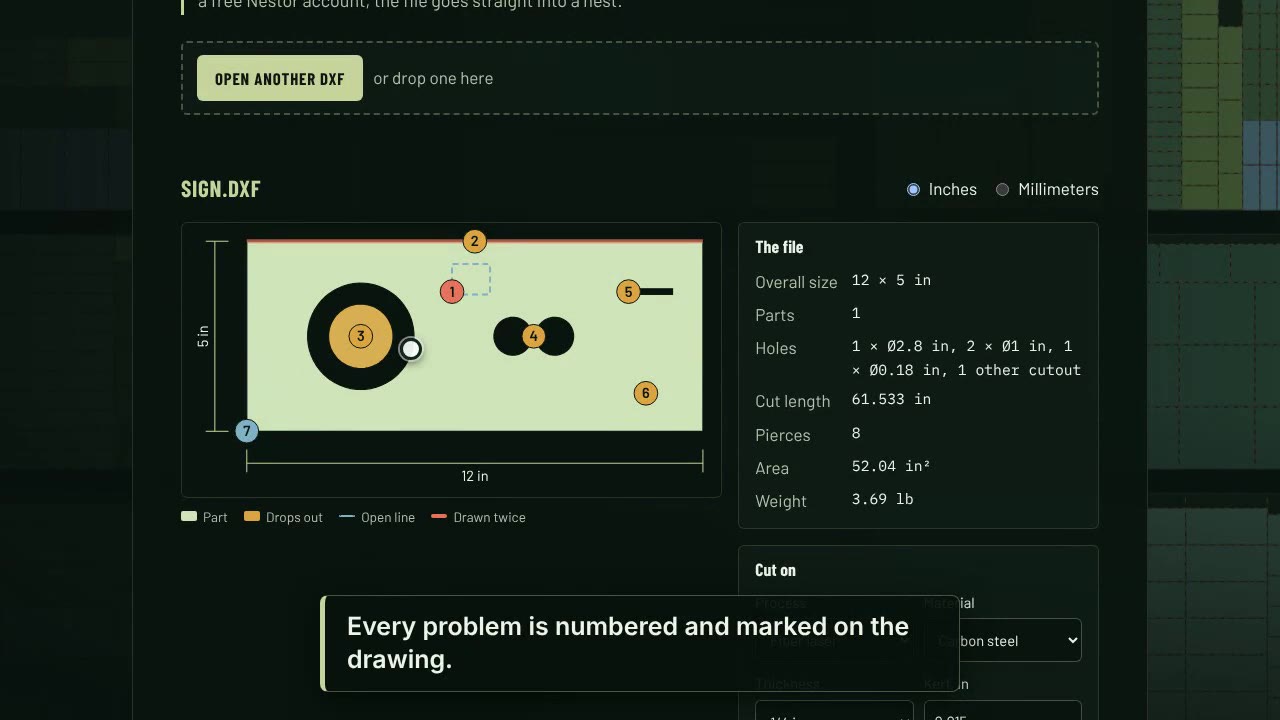
Nestor's DXF viewer opens a DXF file in your browser, free and without an account, and draws it with its overall size. It lists the parts, their holes, the cut length, the number of pierces, the area and the weight, and checks the file for what spoils a cut on a laser, plasma cutter, waterjet or CNC router: shapes that don't close, lines drawn twice, pieces that drop out, steel too thin between cuts, holes smaller than the material is thick, and files with no units. Each one is marked on the drawing. Nest this file takes it straight into a test nest, with no account needed.
 Watch the 1:39 demo videoDXF viewer from start to finish, silent, with captions.
What it checks
Shapes that don't close
Lines that should meet but miss. Gaps up to 0.02 in, a little more on a large drawing, are closed the way most cutting software closes them; a wider gap leaves the shape open, and it won't cut as a part.
Lines drawn twice
A line lying on top of another is the same cut made twice: the machine goes over it again, and a quote from the cut length counts it twice. Lines that share only part of their length are found too.
Pieces that drop out
A shape inside a hole is cut free on every side and falls out, like the middle of an O on a sign, unless bridges (tabs) join it to the part.
Lines too close to cut well
On a laser or plasma, steel between two cuts narrower than the material is thick can burn or bend, and narrower than the kerf it usually burns away. On any machine, slots narrower than the kerf or the router's bit can't be cut open, and parts closer than the kerf cut into each other.
Holes too small
Holes no bigger than the kerf or the router's bit can't be cut to size, and on a laser or plasma, holes smaller than the material is thick tend to come out tapered or rough.
Units
A DXF that doesn't say its units is read in inches, or in millimeters with one click, and the viewer says so when the size reads like the other unit.
What isn't cut
Layers named like drawing furniture (dimensions, text, borders), text and dimension entities, and open lines, which a laser may mark as etch lines.
Several parts in one file
Every part in the file is drawn and listed with its own size and holes.
What it shows
The drawing to scale with its overall width and height, and for each part its size, its round holes by diameter and count, and any other cutouts. Then the cut length and the number of pierces, the figures a cutting quote starts from, and the area and weight for the material and thickness you pick, in inches or millimeters.
How to check a DXF file before cutting
- Open a DXF file, or drop it on the page.
- Pick the process, material and thickness the part will be cut in. The kerf fills in with a typical figure for them, which you can change to your machine's own.
- Read what the viewer found: each finding is numbered and marked on the drawing.
- Fix what needs fixing in your CAD program, or press Nest this file to lay the part out on your sheets.
Questions
Is the DXF viewer free?
Yes. Open as many DXF files as you like, free and without an account. Nesting a file is free too: run a test nest without an account, then create a free account to download it and keep nesting.
Which files does it open?
DXF files in the ASCII (text) format, any version, from any CAD program: lines, arcs, circles, polylines, ellipses, splines and blocks, and 3D solids, read as their flat outline. A binary DXF needs saving again as an ASCII DXF. DWG files aren't read; save them as DXF first.
Does it change my file?
No. The viewer only reads the file to draw it and check it. Nest this file takes it into the nest exactly as it is.
How close is too close?
The viewer compares the narrowest steel between cuts, and the narrowest openings, with the kerf and with the material's thickness. The kerf starts at a typical figure for the process and thickness, from the kerf guide; type your machine's own if you know it. The webs are checked on laser and plasma, where heat is the trouble, with the thickness as a rule of thumb. A waterjet adds no heat and a router's bit stays in the scrap, so there only openings, holes and the gaps between parts are checked against the kerf or the bit.
What does it mean when a piece drops out?
A closed shape inside a hole, like the middle of an O or an A, is cut free on every side and falls through the slats. If it should stay, join it to the part with bridges (tabs) in CAD. If it is a separate part placed there on purpose, there is nothing to fix.
Can I nest the file from here?
Yes. Nest this file takes it into Nestor's DXF nesting tool, where a test nest needs no account; downloading the nest needs a free account, made right there without losing the nest. The nest takes the largest part in a file, so save each part as its own DXF to nest them all.
Need a part drawn? The free DXF generator draws flanges, base plates, rings and plates from a few sizes. Then nest the parts with Nestor’s free DXF nesting for laser, plasma, waterjet and router.